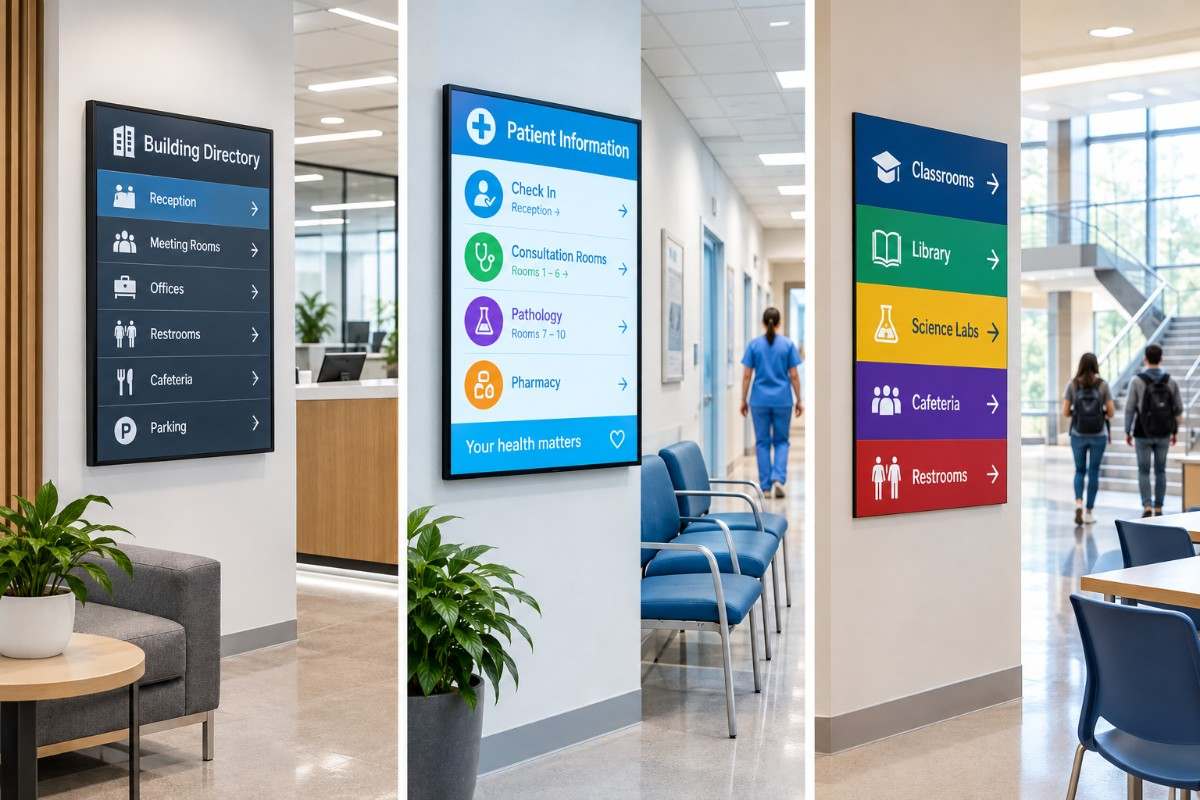
Information signage helps people find their way, understand what is happening and act on important messages. In offices, hospitals and schools, it can replace cluttered noticeboards with clear, up-to-date content that is easy to access. Because messages can change in seconds, staff can stay informed and visitors can find the guidance they need. As a result, more organisations are turning to digital signage displays to keep communication simple and consistent.
This guide explains the best practices for planning information signage in three busy settings: workplaces, healthcare sites and education campuses. You will learn how to place screens, write readable content and choose suitable hardware. In addition, it shows how indoor digital signage from a professional indoor digital signage supplier can support daily communication without adding unnecessary work for your team.
What Is Information Signage and Why Does It Matter?
Information signage is any display that shares practical details with people inside a building. It includes room names, directions, schedules, safety notices, queue updates and general announcements. Traditional printed boards do this job, but information can quickly become outdated and require manual replacement. Digital screens offer an alternative by letting you edit content from one place. Moreover, they can show different messages at different times, which suits places with changing audiences. For example, a reception screen can display visitor guidance in the morning and event information in the afternoon. This flexibility helps keep information relevant and can save valuable staff time.
Digital information signage typically offers:
- Instant updates across one screen or many
- Scheduled content for different times and days
- Clear visuals, including images, icons and short videos
- Consistent branding throughout a building
Information Signage Best Practices for Offices
Offices have many audiences at once. Employees need updates, visitors need directions and clients form an impression within seconds. Good information signage supports all three groups without creating noise. Start by listing what people actually need to know, such as meeting room availability, building notices and health and safety reminders. Then decide where each message belongs. Entrances suit welcome messages and directions, while corridors and break areas suit news and reminders. Placing stand-alone digital totem screens in reception areas can give visitors a clear first point of contact and help keep the entrance tidy.
Reception and Meeting Spaces
Reception screens can welcome guests, display relevant visitor information and point towards lifts or meeting rooms. Any personal information displayed should be appropriate for a public-facing screen. Outside meeting rooms, small screens can show room names and booking times, which may reduce interruptions and confusion. Consistent layouts also help people learn quickly where to look.
Staff Communication Areas
Break rooms and corridors suit company news, safety updates and recognition messages. Keep each slide short and rotate content regularly. In addition, avoid placing screens where glare from windows makes them hard to read. Useful office content includes:
- Welcome messages and visitor directions
- Meeting room names and schedules
- Health and safety reminders
- Company news and event notices
Information Signage in Healthcare Settings
Healthcare sites are often stressful, so clear information signage matters even more. Patients may feel anxious, unfamiliar with the building or in a hurry. Clear directions and calm messages can reduce confusion and help visitors navigate healthcare environments more easily. Screens should use simple wording, large text and a clear, accessible colour palette. Placing a self-service wayfinding kiosk near main entrances can allow visitors to search for departments, clinics and wards without needing to ask reception teams. Meanwhile, waiting-room screens can share queue updates, health advice and hygiene reminders, provided patient confidentiality is protected.
Accessibility and Clarity
Use high-contrast colours, plain language and large fonts to improve readability for people with different visual and communication needs. Position screens at an appropriate viewing height, and use clear icons alongside text to support understanding. Avoid fast animation, because it can distract or unsettle some viewers. Common healthcare content includes:
- Department directions and floor guides
- Waiting time and queue updates
- Visiting hours and safety notices
- Health awareness and hygiene messages
Designing Clear Content for Information Signage
Even the best screen is less effective if the content is hard to read. Information signage should communicate its message clearly and efficiently. Viewers may only glance at a screen before moving on, so use short headlines, plain words and strong contrast between text and background. Keep each slide on screen long enough for its content to be read comfortably, adjusting the duration to suit the amount of information displayed. Furthermore, apply consistent fonts, colours and layouts so that people can recognise your signs easily. A well-designed digital advertising screen can also share branded messages, but practical information should take priority where the primary purpose is guidance.
Keep Messages Short and Scannable
Aim for one idea per slide and keep wording concise, particularly in areas where people are moving past screens. Lead with the most important detail, such as a room number or time. Icons and arrows can help people understand directions quickly when used alongside clear wording.
Use Colour and Layout Consistently
A fixed layout helps viewers know where to find each type of detail. Use a consistent, clearly distinguishable style for urgent alerts so that they stand out. Follow these simple rules:
- Use large, clean fonts that read well from a distance
- Choose colours with sufficient contrast between text and background
- Update content regularly to avoid outdated messages
- Test every slide from the real viewing distance
Using Information Signage in Education
Schools, colleges and universities run on timetables, events and notices. Digital information signage can keep students and staff informed without paper clutter. Corridor screens can show room changes, exam reminders and campus news, while entrance screens can welcome visitors and explain safety procedures. In classrooms and training rooms, touch-enabled interactive panels can support engagement by combining presentations, collaboration and touch-based learning in one device. Together, these tools can contribute to a more connected learning environment.
Campus-Wide Communication
Shared spaces such as canteens, libraries and halls are suitable for announcements. Schedule content by time of day so that lunch menus, club notices and event posters appear when they matter. Central control also lets staff update multiple screens efficiently, which is especially helpful during busy term-time periods.
Supporting Safety Messages
Screens can support the communication of important safety information and, where the appropriate systems are in place, display urgent announcements. Therefore, agree a clear process for urgent messages and ensure staff understand how information is published. Digital information screens should complement, rather than replace, required safety signage and established emergency communication systems.
Choosing the Right Displays for Information Signage
Hardware choice affects both quality and reliability. Indoor digital display screens differ in size, brightness, resolution and operating hours, so match each screen to its space. A bright lobby needs stronger output than a dim corridor. Commercial digital signage displays are designed for extended daily operation, making them better suited to demanding environments than standard domestic televisions. When comparing options, look at build quality, warranty and technical support. For long-running information signage, commercial-grade digital signage screens can provide the durability and image quality that busy buildings require.
Key features to check include:
- Suitable brightness and screen size for the room
- Reliable 24/7 operation where required
- Remote content management
- Flexible wall, ceiling or floor mounting
- Warranty and technical support
Installation and Remote Management
Careful installation helps information signage perform well from day one. We begin with a site survey to confirm mounting surfaces, cable routes and power access. Remote management tools can allow teams to update content across multiple screens from a central location, while compatible systems may also provide screen status monitoring and fault notifications. Moreover, training staff on simple tasks such as changing messages can help organisations keep information current without relying on outside assistance for every update.
Conclusion
Effective information signage is clear, consistent and placed where people need it. In offices, it guides visitors and informs staff. In healthcare, it can help reduce confusion and support communication. In education, it helps busy campuses stay organised. By planning locations carefully, writing simple content and choosing dependable displays, you can create a communication system that supports daily operations.
If you are planning a new installation, Beten is ready to help. With over 16 years of display manufacturing experience and a three-year warranty on its commercial LCD displays, Beten offers support from product selection through to installation. Explore Beten’s display installation and support services today, and start building signage that keeps everyone informed.
Frequently Asked Questions
1. What is information signage?
Information signage is any sign that shares practical details with people in a building. It covers directions, schedules, notices and safety messages. Digital versions let you update content quickly from one place. This helps keep messages accurate and reduces the need for reprinting.
2. Why is digital better than printed information signage?
Digital screens can be updated quickly, while printed signs must be replaced manually. They can also show different messages at different times of day. This helps keep information current and relevant. Digital screens also support images and short videos that can help attract attention.
3. Where should information signage be placed?
Place screens where people naturally pause or pass, such as entrances, reception areas, corridors and waiting rooms. Position them at a comfortable viewing height and away from glare. Walk the building to see where visitors hesitate. Those points can be particularly useful places to provide guidance.
4. How much text should an information sign display?
Keep text short and focused, ideally communicating one main idea per slide. The appropriate amount of text depends on viewing distance, audience and how long the information remains visible. Large fonts and strong contrast make messages easier to read quickly. Icons and arrows can also help communicate information efficiently.
5. Can one system manage screens in different rooms or sites?
Yes, compatible remote content management systems can allow you to control multiple screens from one dashboard. You can send the same message everywhere or tailor content to each location. This can save time and help maintain consistent branding. It also supports quicker updates when important information changes.