Outdoor digital displays help businesses capture attention in busy public spaces, from high streets and car parks to transport hubs and retail parks. When a screen is positioned well and set up properly, it can help turn passing footfall into genuine interest. However, outdoor conditions are tough. Sunlight, rain, dust and temperature swings all affect how well a screen performs.
This guide covers the best practices for high-visibility locations, helping you get more from the screens supplied by a leading outdoor digital signage supplier. You will learn how to choose sites, manage brightness, protect hardware and design content that people can read in seconds. In addition, it explains how to plan ahead so your outdoor digital signage UK project stays reliable for years.
Why Outdoor Digital Displays Work in Busy Places
Outdoor digital displays can reach people at relevant moments throughout their day. Shoppers deciding where to eat, commuters checking times and drivers looking for directions all pay attention to what is in front of them. Unlike printed posters, a digital screen can change its message throughout the day. As a result, a café can promote breakfast in the morning and evening specials later. Moreover, motion and bright imagery can help attract attention compared with static boards, particularly in crowded streets.
The main advantages include:
- Messages that update instantly, without reprinting
- Scheduling by time of day, day of week or season
- Strong visual impact through video and animation
- Central control across several sites
Choosing the Right Location for Outdoor Digital Displays
Location decides how much value your screen delivers. Even the best digital signage outdoor screens will underperform if they sit in a quiet corner or behind an obstruction. Begin by walking the site at different times of day. Note where people slow down, queue or gather, because those moments create the longest viewing opportunities. Open forecourts and building entrances often suit standing outdoor totem displays, so check whether there is space for one. Equally important, consider how far away viewers will be, since distance determines the screen size and text height you need.
Study Footfall and Dwell Time
Footfall tells you how many people pass, while dwell time tells you how long they stay. A bus shelter or entrance queue offers several minutes of attention, whereas a fast-moving pavement offers only a few seconds. Therefore, match your message length to the time available. Short, bold content suits busy walkways, while detailed offers suit waiting areas. Counting people at different hours also helps you schedule your most important content for peak periods.
Check Sightlines and Viewing Angles
Stand where your audience will stand and look at the planned position. Trees, lamp posts, parked vehicles and other signage can all block the view. Check the angle too, because screens read best when viewers face them close to head-on. In addition, think about safety, so that drivers and pedestrians can see the screen without being distracted.
Consider these checks before you commit:
- Is the screen at a comfortable eye level for the viewing distance?
- Does direct sun hit the front panel at any point in the day?
- Is there reliable power and network access nearby?
- Can people see the screen clearly from both approach directions?
Managing Brightness on Outdoor Digital Displays
Brightness is one of the most important factors in outdoor visibility. A standard indoor screen looks washed out in daylight, so outdoor models use much stronger backlighting. This is measured in nits, and the figure should be high enough to stay readable on a sunny afternoon. For example, glass-fronted shops often face the same challenge, which is why sunlight-readable high brightness screens are popular for storefronts facing the street. At the same time, a screen should not dazzle people at night, so careful control is essential.
Use Automatic Brightness Control
Built-in light sensors adjust the screen output as conditions change. This keeps content readable at midday and comfortable at dusk. It can also reduce energy consumption and help extend the life of the backlight. For best results, combine sensors with scheduled dimming for late evenings and early mornings, when lower output is perfectly adequate.
Reduce Glare and Reflections
Anti-glare glass and optical bonding improve contrast by reducing internal reflections. Furthermore, depending on the installation, adjusting the screen angle may help reduce reflections. Always test the display at noon and at sunset before final installation, because the sun’s angle changes the viewing experience dramatically.
Choosing the Right Format for Your Site
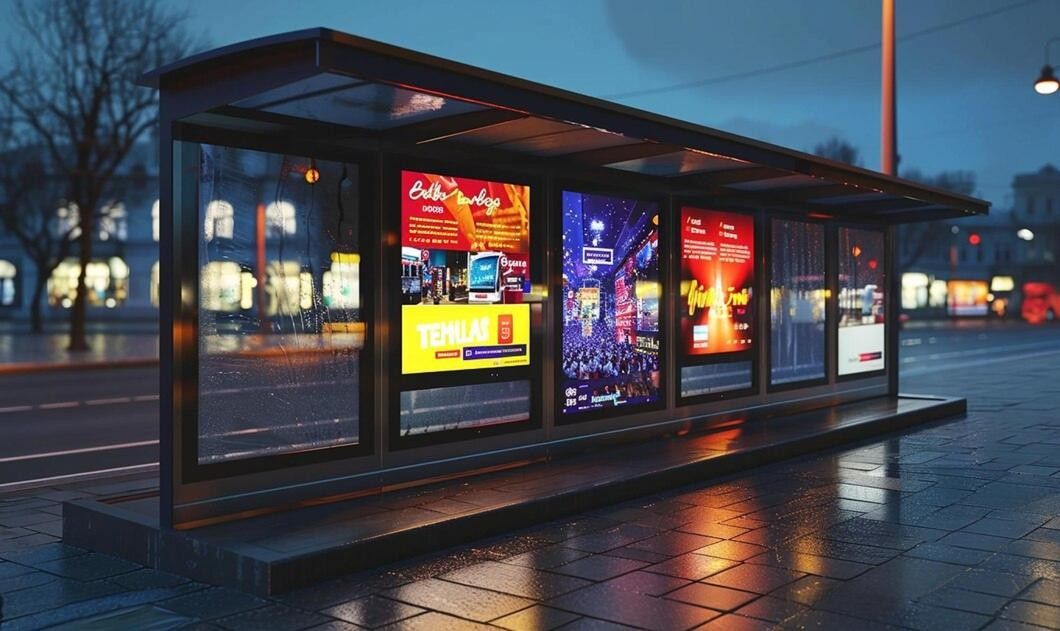
Different locations call for different formats. A wall-mounted screen suits a building facade, while free-standing units work better in open spaces. Your choice should reflect viewing distance, audience type and the message you plan to show. For instance, a retail park needs wide visibility from car parks, whereas a hotel entrance benefits from a more refined, compact presence. Many businesses also prefer an experienced outdoor digital signage manufacturer, because it can tailor sizes, mounting and features to the site.
Free-Standing Totems
Slim vertical units can be installed in forecourts, walkways and entrances without requiring mounting directly onto a building. They suit wayfinding, event promotion and brand messaging. In particular, a totem gives your business a visible landmark that people can spot from a distance, even in a busy setting.
Drive-Thru Menu Displays
Quick-service restaurants rely on clear menus that drivers can read from the car window. Weather-ready menu screens can support order accuracy, improve operational efficiency and allow quick menu changes throughout the day.
Protecting Outdoor Digital Displays from the Weather
British weather is unpredictable, so durability must be built into every screen. Rain, humidity, frost, dust and salt air near the coast can all damage unprotected electronics. Look for sealed enclosures, strong ingress protection ratings and effective temperature control. Reliable manufacturers also test products under extreme conditions before shipping. Beten, for example, tests displays for high temperature and humidity, dust and salt spray, thermal cycling and random vibration. Whichever durable outdoor signage products you choose, this kind of testing supports dependable performance outdoors.
Key protection features to look for:
- Waterproof, sealed housings
- Cooling and heating systems for temperature extremes
- Tempered, impact-resistant glass for public areas
- Corrosion-resistant finishes for coastal sites
Designing Content for Outdoor Digital Displays
Even the best hardware fails if the content is hard to read. Passers-by give outdoor screens only a few seconds, so every message must be simple. Use large, clean fonts, strong colour contrast and minimal text. A good rule is to keep one idea per slide. Menu content needs the same discipline, as drivers reading digital menu boards for drive-thru lanes must choose quickly from a short, clear list. Furthermore, avoid thin typefaces and pale colours, because they disappear in bright light. Short video loops can be effective, particularly when viewers join midway through.
Follow these content tips:
- Keep headlines to six words or fewer
- Use high-contrast colour pairs, such as white on dark blue
- Include one clear call to action per slide
- Refresh content regularly to keep it noticed
Installation and Remote Management
Careful installation helps protect your investment. Begin with a professional site survey to check mounting surfaces, cabling routes and power supply. Depending on the location and type of installation, outdoor digital signage may require advertisement consent or other relevant permissions, so local requirements should be checked before installation.
Compatible remote content management systems can allow you to update content, monitor screen status and receive fault alerts without visiting the site. Beten also offers surveys, installation support and technical assistance, with services depending on individual project requirements.
Conclusion
Successful outdoor digital displays depend on a few clear principles. Choose a location with strong footfall and clear sightlines, select a format that suits the site, and prioritise brightness and weather protection. Then design simple, high-contrast content that communicates your message effectively. When these elements work together, your screens are better positioned to remain visible, reliable and effective in every season.
If you are ready to plan your next project, request a free consultation with Beten and get expert guidance from the start. Beten can help you choose and install the right solution. Speak to our team today and turn your high-visibility location into a powerful communication point.
Frequently Asked Questions
1. What makes outdoor digital displays different from indoor screens?
Outdoor displays have higher brightness, sealed housings and wider temperature tolerance. They are built to cope with rain, dust, sunlight and frost. Indoor screens lack this protection and can fail quickly outside. Choosing a purpose-built outdoor model keeps the picture clear and the hardware dependable.
2. How bright should an outdoor screen be?
It should be bright enough to stay readable in direct daylight. Screens placed in full sun need much stronger output than those in shade. Automatic brightness control helps by adjusting to the light around the screen. This keeps content clear by day and comfortable at night.
3. Where are the best places to install outdoor digital signage?
Busy entrances, car parks, high streets, transport hubs and retail parks all work well. The best spots combine strong footfall, long dwell times and clear sightlines. Walk the site at different times of day before deciding. This shows you where people naturally slow down and look.
4. Can content on outdoor screens be updated remotely?
Yes, most modern systems support remote content management. You can change messages, schedule campaigns and check screen status from one central location. This saves site visits and keeps information fresh. It is especially useful when you manage several screens across different areas.